折腾啥

  1. ╔• 目录导航

    ╔• 目录导航
    ║
    ╠• Sub-Store
    ╠• iOS & macOS
    ╠• Android
    ╠• 浏览器
    ╠• AI
    ╠• 服务器 & 自建
    ╠• 内网穿透 公网打洞
    ╠• 探针
    ╠• homepage
    ╠• 免流
    ║ ├ 从 0 搭建一个 AnyTLS 节点
    ║ ├ 从 0 搭建一个 Shadowsocks 2022 + Shadow TLS V3 节点
    ║ ├ 从 0 搭建一个 Snell + Shadow TLS V3 免流节点(当然过墙也是杠杠的)
    ║ ├ sdk250 大佬用 C 写的 HTTP 代理 仓库
    ║ ├ 免流 混淆 零跳 总结
    ║ ├ 免流 混淆 零跳 总结(2)
    ║ ├ 广东联通免流机制
    ║ └ 免流混淆转换
    ║
    ╠• 路由器
    ╠• Telegram 人形自走机器人
    ╠• 3D 打印
    ║
    ╚• 目录导航

    🎁 恰饭推荐 📢 频道 👥 群组 💬 联系推广 🌐 网站

    • ❤️5
    • 👍4
  2. ╔• 目录导航

    ╔• 目录导航
    ║
    ╠• Sub-Store
    ╠• iOS & macOS
    ╠• Android
    ╠• 浏览器
    ╠• AI
    ║ ├ Codex 宠物:《黑暗圣经 》伊万里胡桃
    ║ ├ Codex 宠物:《鬼父》秋月爱莉
    ║ ├ Skills 安装配置方法(含 OpenClaw 配置方法)
    ║ ├ SDD-RIPER-ONE 简单使用感受
    ║ ├ Compound Engineering: 使用感受
    ║ ├ Skill: ollama-web 搜索/获取网页内容
    ║ ├ Skill: Pollinations 图像生成
    ║ ├ Skills: 免 Key 白嫖 Exa/Google 搜索, 获取链接/网页
    ║ └ OpenClaw 支持 API 模型的 qmd
    ║
    ╠• 服务器 & 自建
    ╠• 内网穿透 公网打洞
    ╠• 探针
    ╠• homepage
    ╠• 免流
    ╠• 路由器
    ╠• Telegram 人形自走机器人
    ╠• 3D 打印
    ║
    ╚• 目录导航

    🎁 恰饭推荐 📢 频道 👥 群组 💬 联系推广 🌐 网站

    • ❤️2
    • 👍2
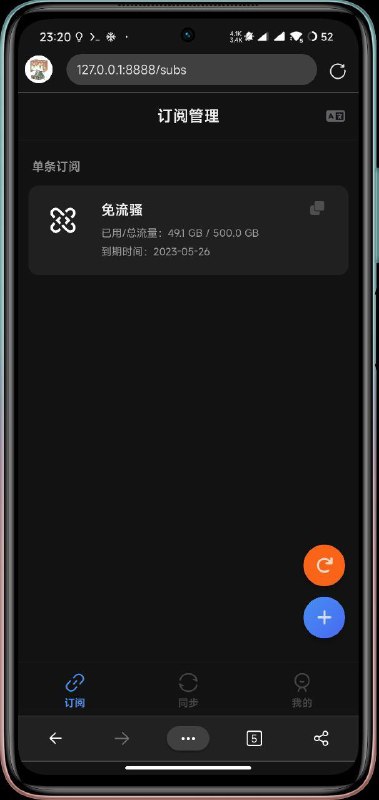
  3. #Android 🐒 上使用本地版 #Sub-Store

    #Android 🐒 上使用本地版 #Sub-Store


    更新: 查看最新版教程


    ———-

    # termux 中

    pkg install node git

    npm i -g pnpm

    pnpm setup

    pnpm i -g pm2

    # 日志插件
    pm2 install pm2-logrotate
    cd ~
    git clone https://github.com/sub-store-org/Sub-Store.git
    cd Sub-Store/backend
    pnpm i
    pnpm build
    # 后端
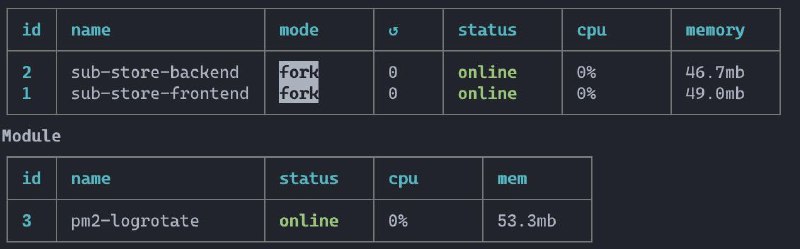
    pm2 start "npm run serve" --name sub-store-backend
    # 日志
    # pm2 logs sub-store-backend

    cd ~
    git clone https://github.com/sub-store-org/Sub-Store-Front-End.git
    cd Sub-Store-Front-End
    pnpm i

    # 编辑 .env.development 的最后一行为 VITE_API_URL = 'http://127.0.0.1:3000'
    # 偷懒了 开发模式
    pm2 start "npm run dev" --name sub-store-frontend
    # 日志
    # pm2 logs sub-store-frontend

    pm2 save

    # 打开 http://127.0.0.1:8888

    🔚

    求个 ⭐️ https://github.com/sub-store-org/Sub-Store

    • 👍15
    • ❤️1
    • 🎉1
  4. Apple 的量子科技

    Apple 的量子科技 https://vxtwitter.com/xream/status/1580384860585496578

    • 👍2
  5. Hacker News
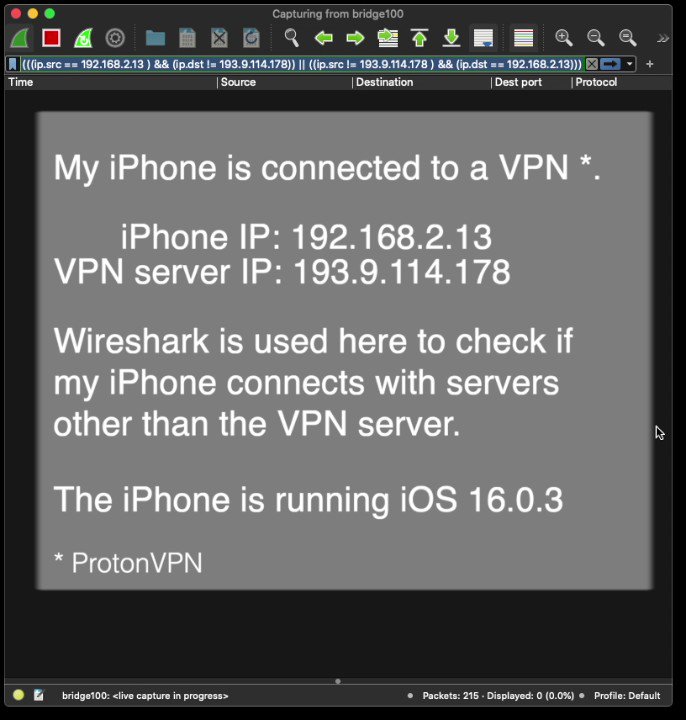
    iOS allows DNS request to escape the VPN tunnel https://twitter.com/mysk_co/status/1579997801047822336
    https://vxtwitter.com/mysk_co/status/1580143348135829504 Mysk 🇨🇦🇩🇪 (@mysk_co)

    • 👍2
  6. iOS allows DNS request to escape the VPN tunnel

    Forwarded from Hacker News (yahnc_bot)
    iOS allows DNS request to escape the VPN tunnel https://twitter.com/mysk_co/status/1579997801047822336 Twitter

    • 👍1
  7. 配合订阅/节点无脑走代理 真香 适合懒得自己配的人🐶

    配合订阅/节点无脑走代理 真香 适合懒得自己配的人🐶 https://github.com/mzz2017/gg GitHub - daeuniverse/gg: 一个支持节点与订阅链接的 Linux 命令行代理工具 | A command-line tool for one-click proxy in your research and development…

    • 👍3
  8. #Sub-Store 服务器版(压缩包里内容已过期)

    #Sub-Store 服务器版(压缩包里内容已过期)

    🆕 2023-02-23

    自建和白嫖教程看 https://t.me/zhetengsha_group/116418/224836

    🆕 2023-02-22

    直接看这段:

    官方后端缓存没处理 用这个:
    下载 https://t.me/zhetengsha_group/130215?thread=116418
    直接启动
    node sub-store.min.js
    或 用 pm2 启动

    然后用 nginx 反代 实现 https://your-sub-store-api.com/paaaaaath -> 127.0.0.1:3000

    然后 https://sub-store-xream.pages.dev?api=https://your-sub-store-api.com/paaaaaath 或 https://sub-store.zhetengsha.eu.org?api=https://your-sub-store-api.com/paaaaaath 即可

    🔚
    —-—-—-—-

    如果不想部署前端 可按教程部署后端后, 使用通用前端: https://t.me/zhetengsha_group/68920

    前置知识:

    1. Nginx 的简单配置: root 和 proxy_pass

    2. Node.js, pnpm 和 pm2 的简单使用
    sub-store 服务器版说明.zip
    3.8 KB

    • 👍5
  9. 转一个固定热点机IP的方法

    转一个固定热点机IP的方法

    固定IP后, 可在连接热点机网络的设备上使用

    http://192.168.43.1:9090/ui/?hostname=192.168.43.1&port=9090&theme=auto&secret=密码

    一键打开面板

    查看 👉🏻: https://t.me/kidneykiller/119

    • 👍6
    • ❤️1
    • 😁1