
折腾啥

  1. iCTRL —— 用 AI 直接操作 iPhone 的开源方案

    Forwarded from LPの库
    iCTRL —— 用 AI 直接操作 iPhone 的开源方案
    基于 XCUITest 的 iOS 自动化服务:手机上跑一个常驻 runner,对外提供 JSON-RPC 2.0 over HTTP(默认 8200)。点击、滑动、输入、读屏、截图、启动 App、读无障碍树,都走这一个接口。
    为什么好用
    • 自带说明书:GET /skill 是给 AI 读的手册,GET /schema 列出每个方法的参数
    • 快:点击约 280ms,读屏 p50 约 0.4s,长列表也不卡
    • 无障碍树看不到的内容(网页、自绘文字)自动用设备端 OCR 兜底
    • 安全:配对要在手机上点 Allow,之后请求全程加密(X25519 + sealed 信封);默认只监听 127.0.0.1
    • 不用越狱,也不用 Mac:SideStore 签名 + 在设备上挂 DDI 就能跑
    • 客户端从设备直接下载(静态 C CLI / Python),适合在手机上跑的 agent
    上手四步
    1. 签名安装 iCTRLUITests-Runner.ipa(SideStore 或 Xcode),打开开发者模式
    2. 挂载 Developer Disk Image(iCTRL App / StikDebug / Xcode)
    3. 启动 runner,允许「通知」与「本地网络」
    4. 把地址告诉 agent:「我的 iPhone 跑着 iCTRL,IP:8200,你自己搞清楚怎么用」,剩下它自己学
    开源地址:github.com/OpenMinis/iCTRL GitHub - OpenMinis/iCTRL: An AI-friendly iOS/iPadOS automation testing tool built on XCUITest, but more than a testing tool: agents…
    • ⭐2
    • ❤️3
    • 👍2
  2. I’d like to share a new side project of mine: an open-source remote desktop solution for iOS—specifically for the iPad—designed as a superior alternative to existing VNC and RDP clients.

    I’d like to share a new side project of mine: an open-source remote desktop solution for iOS—specifically for the iPad—designed as a superior alternative to existing VNC and RDP clients.

    https://github.com/nekohasekai/open-screen-sharing

    • 👍5
    • ❤️1
  3. Forwarded from cctv18的红茶馆
    https://bbs.kanxue.com/thread-293244.htm
    https://bbs.kanxue.com/thread-293246.htm
    高通和mtk提取keybox的漏洞(部分机型)同时被公开
    这下机圈过年了

    • 👍4
    • ❤️1
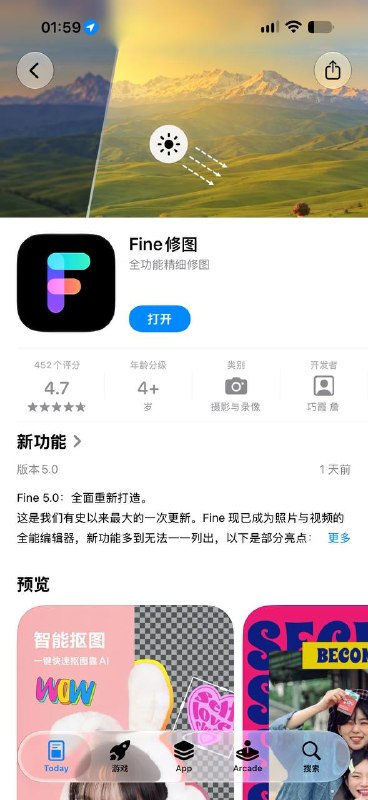
  4. 一款很好用的修图 APP 会员解锁

    一款很好用的修图 APP 会员解锁
    商店 4.7 分


    脚本功能:解锁 Fine Pro 会员
    使用方法:添加到重写,打开 Fine 即可生效

    App Store 应用下载: Fine修图

    QX脚本链接:
    https://raw.githubusercontent.com/curtinp118/Scripthub/main/scripts/finepro/finepro.js

    感谢群友 @Curtinp118 投稿

    模块脚本合集 合集 群组 恰饭 联系推广

    #模块 #插件 #脚本 #解锁

    • 👍9
  5. 【E起谈料】P家的弹性PETG,最适合cos道具的耗材

    【E起谈料】P家的弹性PETG,最适合cos道具的耗材
    PETG/TPU共混体,弹性PETG 很适合打cos道具 头壳 关节等模型

    @诶文Evan76:
    发布视频
    播放量:3459 弹幕:1 评论:40
    点赞:129 投币:9 收藏:141 转发:88
    发布日期:2026-10-15 04:00:00
    上传日期:2026-10-14 14:43:00


    合集 群组 恰饭 联系推广

    #3D #打印 #耗材 #PETG #TPU
    Media is too big
    VIEW IN TELEGRAM

  6. test-audit: 跨 AI 编程助手的测试编写与审计 Skill

    test-audit: 跨 AI 编程助手的测试编写与审计 Skill

    Delusions 佬从 OpenClaw 移植的 test-audit

    • 基于可观察契约和可信回归筛选新增测试,提升测试用例的验证价值

    • 识别重复测试、实现耦合验证与测试专用生产代码,系统清理低价值测试

    • 支持 Pi、Claude Code、Codex 与 Cursor,通过统一 Skill 复用测试审计工作流

    https://github.com/Delusions6515/test-audit

    合集 群组 恰饭 联系推广

    #测试工程 #测试审计 #AI编程 #ClaudeCode #Codex #Cursor #GitHub

  7. UU 远程集成指南: 通过 URL Scheme 为 App 接入 Windows / macOS 设备远程控制能力

    UU 远程集成指南: 通过 URL Scheme 为 App 接入 Windows / macOS 设备远程控制能力

    https://fixupx.com/uu_remote/status/2111037737172336975

    • 提供设备绑定与加密设备标识管理,支持 iOS 和 Android 调用端接入

    • 支持全屏与 PiP 画中画远控模式,覆盖连接状态和失败原因回调

    • 附带 iOS / Android 示例代码、安装检测方案与完整错误码说明

    https://github.com/netease-uuyc/uuremote-integration-guide

    合集 群组 恰饭 联系推广

    #远程控制 #跨App集成 #iOS #Android #Windows #macOS #URLScheme #GitHub 网易UU远程 (@uu_remote)

    • 👍12
    • ❤️2
  8. Script Hub Beta 版 更新

    Script Hub Beta 版 更新

    感谢染指和 Tartarus 等最近的努力!

    ▎新增了 Loon 相关的逻辑, 修复了 Surge 相关的逻辑

    太多了 其实我也不知道具体改了啥 请直接看 commits

    欢迎 PR. 但是需要维护. 可先 PR 到 beta 文件里

    项目地址

    模块脚本合集 合集 群组 恰饭 联系推广

    #ScriptHub #更新记录 #changlog #updates

    • 👍6
    • ❤️2
  9. yutto: 面向命令行用户的 B 站视频与番剧下载工具

    yutto: 面向命令行用户的 B 站视频与番剧下载工具

    • 支持投稿视频、番剧、课程等资源下载,兼容 AV、BV、EP 等资源标识

    • 提供单集与批量下载模式,可自动解析系列内容

    • 支持 AVC、HEVC、AV1 多种视频流及 ASS 弹幕生成,并提供 Docker、Homebrew、pipx 和 uv 安装方式

    https://github.com/yutto-dev/yutto

    合集 群组 恰饭 联系推广

    #B站 #视频下载 #命令行 #Python #开源项目 #GitHub

    • 👍5
    • ❤️2
  10. 我们做苹果限免很长时间了,以前一直都是人工挑选后再发出来的,这样可以确保部分的质量,但也有不好的地方那就是会错过不少的限免

    Forwarded from 聚合解析姬
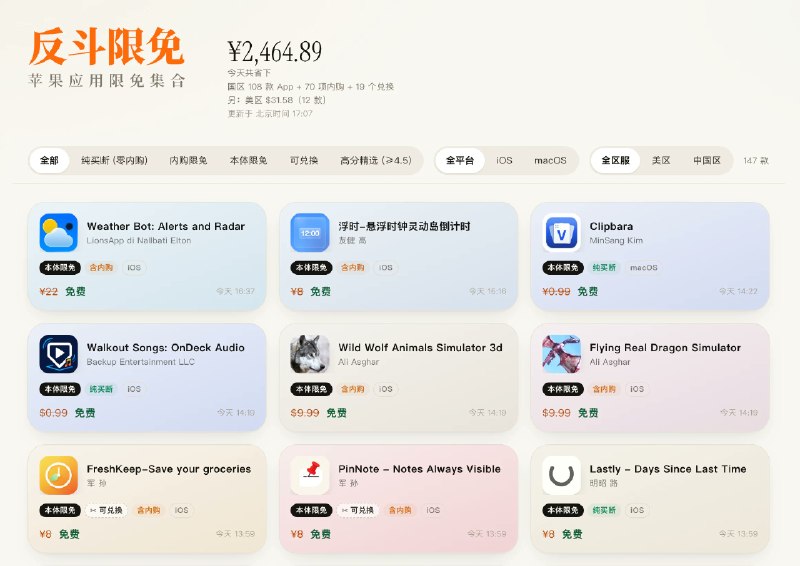
    我们做苹果限免很长时间了,以前一直都是人工挑选后再发出来的,这样可以确保部分的质量,但也有不好的地方那就是会错过不少的限免。

    所以我们现在推出了一个新的网站,基于苹果App Store网页接口进行的限免监控,尽可能地囊括更多限免,让大家有更好的选择。

    网站是:https://t.co/0jQtUHpMgW

    ▎Source

    • 👌7
    • ❤️1
  11. floorplan-3d: 基于浏览器的 2D / 3D 一体化户型装修设计工具

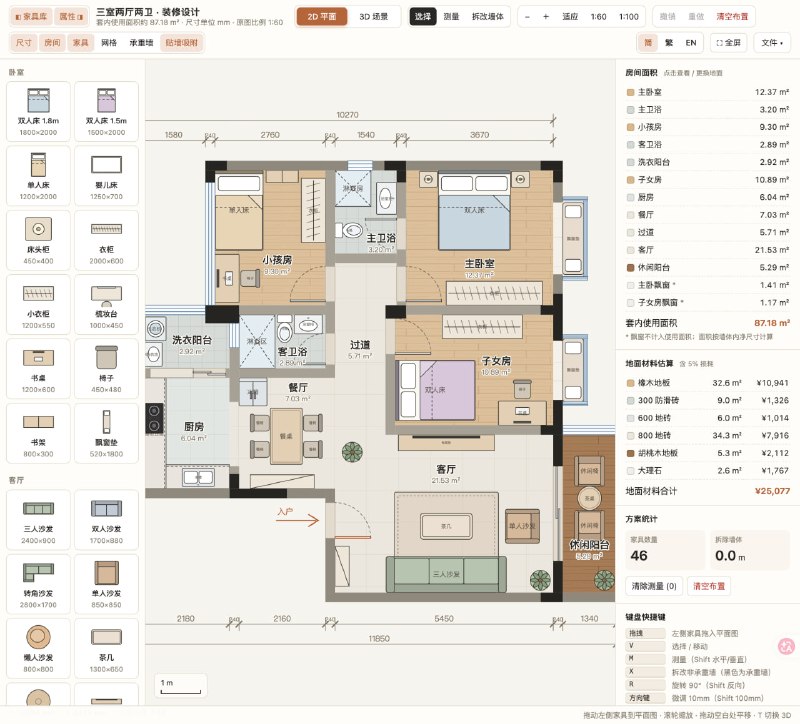
    floorplan-3d: 基于浏览器的 2D / 3D 一体化户型装修设计工具

    • 在 SVG 平面图中拖拽 60 余种家具,支持尺寸测量、墙体拆改、旋转缩放与贴墙吸附
    • 基于 Three.js 提供鸟瞰、房间飞行与第一人称漫游,2D / 3D 家具编辑实时同步
    • 自动统计房间面积与材料造价,支持方案本地保存、PNG 导出及 JSON 导入导出

    https://github.com/wy51ai/floorplan-3d

    合集 群组 恰饭 联系推广

    #户型设计 #室内设计 #Three.js #JavaScript #SVG #开源项目

    • ❤️2
    • 👍1
  12. WLOC 虚拟定位 · Scripting 尝鲜版

    Forwarded from Scripting App
    WLOC 虚拟定位 · Scripting 尝鲜版
    需最新tf版本 3.3.0(26)
    一键安装
    使用文档
    维护文档
    走苹果官方开发者接口改定位,和 Xcode 的 Simulate Location 同一套机制。不装证书、不改系统、不靠代理改写。

    iOS 17+,需开启开发者模式。
    脚本内 PIN 配对,不用装别的 App。定点、步行/跑步/骑行/驾车、多方案路线、手绘路径、摇杆、GPX、全球搜索,锁屏和灵动岛卡片可一键恢复真实位置。
    等应用更新(作者说今晚或明早)
    · 目前只能用 Scripting 自带 VPN,会顶掉代理工具
    · 锁屏可能掉线(定点会自动重连)
    · 模拟时查不到地名,显示坐标
    · 3D 视角下点选不精确,按中央准星落点
    系统限制,不会改
    · 银行保险这类应用识别得出,改不了
    · 停止后地图未必立刻回真实位置(Xcode 也一样),开地图 App 触发一次
    · 重启后要重新配对
    问题走 GitHub Issue,别贴配对记录。

    • 👍9
    • ❤️2
  13. 海量更新

    海量更新 https://t.me/StashFeed/263

    • 🐳3
    • 👍1
  14. Sub-Store 更新

    Sub-Store 更新

    ⚙️ 后端: 2.42.5

    🌐 前端: 2.34.1

    ▎分享支持长期有效

    感谢 PR

    ▎produceArtifact 可通过 includeRaw: true 同时返回处理结果和 context.raw 对应的原始内容

    详见 demo.js

    承接频道/群广告
    有需要的老板可以私聊联系


    Sub-Store 合集 合集 恰饭推荐 群组 联系推广

    #SubStore #更新记录 #changlog #updates

    • 👍4
    • ❤️1
  15. AIME: 基于 RIME 的开源 macOS 中文输入法,支持本地优先与可选 AI 辅助

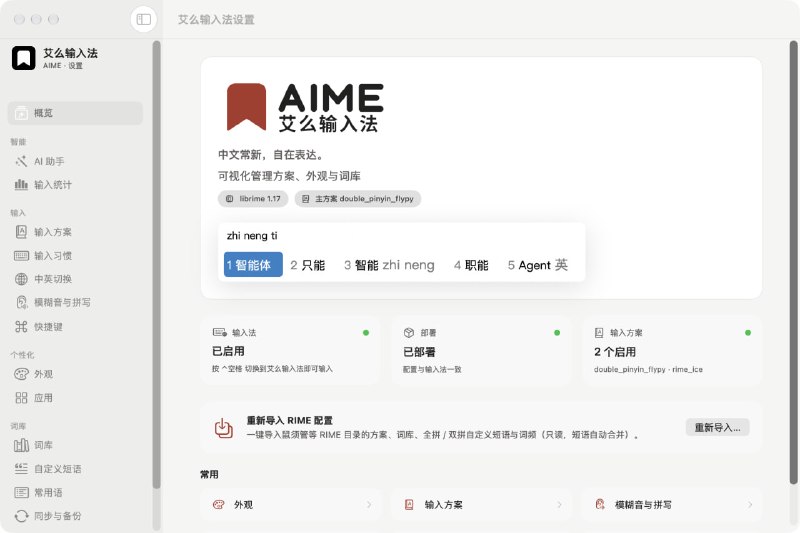
    AIME: 基于 RIME 的开源 macOS 中文输入法,支持本地优先与可选 AI 辅助

    • 基于 librime 与雾凇拼音,支持全拼、双拼、词库订阅及鼠须管配置导入

    • 日常输入、词频和统计均在本机处理,提供可视化设置、主题定制与本地备份

    • 长按 ⌥ + 空格调用翻译、润色和自定义 AI 动作,支持 Apple 端侧模型与 OpenAI 兼容接口

    https://github.com/zoolapp/aime

    合集 群组 恰饭 联系推广

    #中文输入法 #macOS #RIME #开源 #AI

    • 🤡1
  16. Incoming Connections for Tailscale and WireGuard

    Forwarded from Surge TestFlight Feed
    Incoming Connections for Tailscale and WireGuard

    Surge can now accept connections that come in through Tailscale and WireGuard, not just send traffic out. Incoming requests are handled like any other request: they go through your rules and policies and show up in the request list.

    Tailscale
    - accept-incoming = true: other devices on your tailnet can connect to this device through its tailnet address. For example, they can use Surge's HTTP/SOCKS5 proxy or other services running on this device.
    - advertise-exit-node = true: offer this device as an exit node. Other tailnet devices that select it send all their internet traffic through Surge's rules.
    - advertise-routes = 192.168.1.0/24, ...: offer this device as a subnet router for the listed networks.
    - Exit nodes and subnet routes take effect after you approve them in the Tailscale admin console.

    WireGuard
    - accept-incoming = true: the peer side can open connections to this device through an existing tunnel.
    - listen-port = 51820: Surge acts as a WireGuard server that phones, laptops, and other clients can connect to. A peer can leave out endpoint; Surge learns the client's address when it connects and keeps up when the address changes.
    - Clients can set Surge's tunnel address as their DNS server, and Surge's DNS will answer their queries.

    Note: Surge does not apply your Tailscale access control policy to incoming connections. Use rules such as SRC-IP to limit who can reach which destination.

    Requires iOS 5.24.0+ / Mac 6.11.0+. See the Tailscale and WireGuard pages in the manual for details and example configurations.

    • 👍3
    • ❤‍🔥1
    • 🤡1
  17. 一则来自森林集的告别信

    Forwarded from 聚合解析姬
    一则来自森林集的告别信。

    ▎Source

    • ❤️2
    • 👍2