Search: #cloudflared

  1. cloudflared 教程更新 指定 protocol 的补充说明默认 quic 可能连接不畅systemctl edit --full cloudflared.service加上参数 --protocol

    cloudflared 教程更新

    指定 protocol 的补充说明

    默认 quic 可能连接不畅

    systemctl edit --full cloudflared.service

    加上参数 --protocol http2

    重启 systemctl daemon-reload; systemctl restart cloudflared

    原消息

    内网穿透合集 频道资源合集 恰饭推荐 群组

    #cloudflared #cf #内网穿透

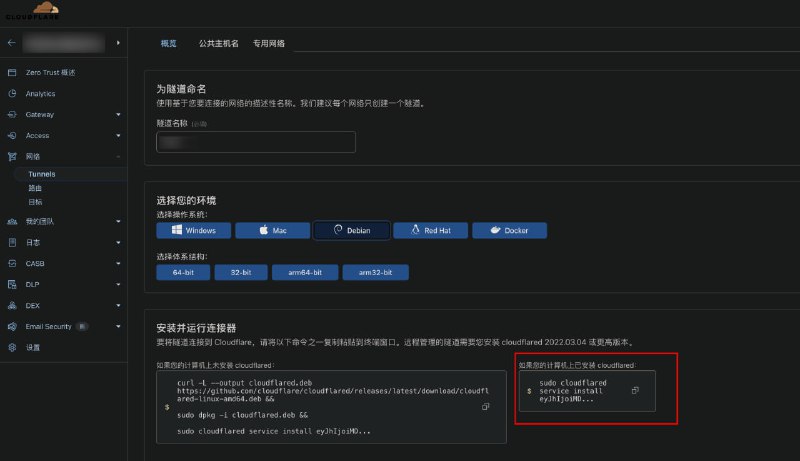
  2. 二进制版 cloudflared 教程包管理器安装的 cloudflared 只能用包管理器更新1. 下载二进制官网 或 GitHub 下载对应平台的二进制文件, 重命名为 cloudflared, 放入 /usr/local/bin/顺便检查一下 cloudflared version2. 在 Cloudflare Zero Trust 后台上 如图复制命令执行即可将会自动创建服务查看服务状态 systemctl status cloudflared3. 开启自动更新(如果你需要的话)编辑 /etc/systemd/system/cloudflared.service去掉 --no-autoupdate 参数重启 systemctl daemon-reload; systemctl restart cloudflared注意: 你随时可用 cloudflared update 手动更新4. 指定 protocol默认 quic 可能连接不畅systemctl edit --full cloudflared.service加上参数 --protocol

    二进制版 cloudflared 教程

    包管理器安装的 cloudflared 只能用包管理器更新

    1. 下载二进制

    官网GitHub 下载对应平台的二进制文件, 重命名为 cloudflared, 放入 /usr/local/bin/
    顺便检查一下 cloudflared version

    2. 在 Cloudflare Zero Trust 后台上 如图复制命令执行即可

    将会自动创建服务

    查看服务状态 systemctl status cloudflared

    3. 开启自动更新(如果你需要的话)

    编辑 /etc/systemd/system/cloudflared.service

    去掉 --no-autoupdate 参数

    重启 systemctl daemon-reload; systemctl restart cloudflared

    注意: 你随时可用 cloudflared update 手动更新

    4. 指定 protocol

    默认 quic 可能连接不畅

    systemctl edit --full cloudflared.service

    加上参数 --protocol http2

    重启 systemctl daemon-reload; systemctl restart cloudflared

    内网穿透合集 频道资源合集 恰饭推荐 群组

    #cloudflared #CF #Cloudflare #内网穿透

    • ❤️1