深色模式浏览器插件
很多人在用 Dark Reader 一般场景使用也够了
但是如果你对它不满意
 试试超高度自定义的
 Midnight Lizard
PS: 有群友推荐了
 Night Eye
 翻 Reddit 看到的
- ❤️4
 试试超高度自定义的 Midnight LizardNight Eye 翻 Reddit 看到的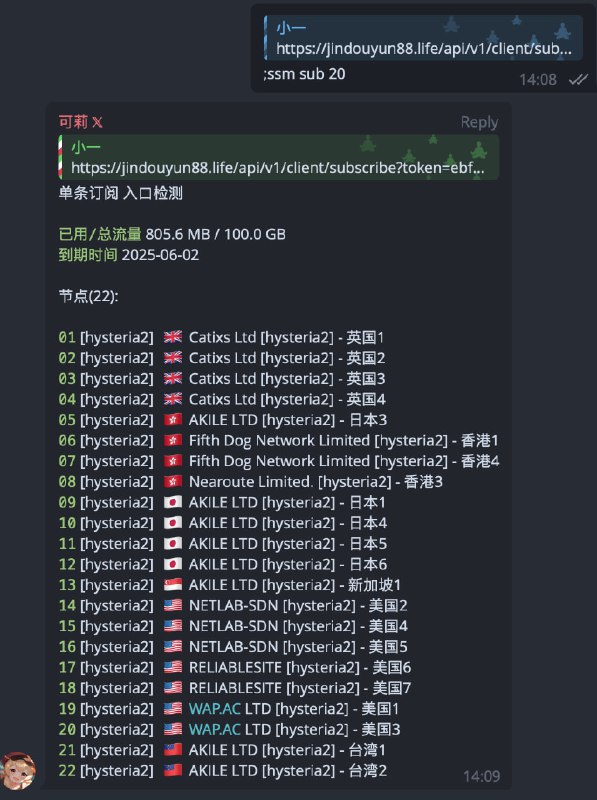
 Sub-Store 的人形脚本
 修复流量查询
 将被回复的消息内容(订阅或节点)作为参数传入单条订阅(比如创建一个空的本地订阅, 逻辑为入口检测. 可查看 https://t.me/zhetengsha/214 )
,ssm sub 1 (为方便小白 从 1 开始, 与 subs 列表对应) 其他 请查看 发布帖
基于ClashMeta的多平台代理客户端,简单易用,开源无广告。
现阶段已知致命的bug应该没有什么了,之后应该会优先添加细节(比如访问控制搜索,批量更新资源,配置遮挡这类问题),主要在telegram上发布(因为可交流),稳定之后再发布github release
一定不会加广告,一定不会有任何收费项目,开屏只是为了项目体验更好(软件都开源了,要是有这些,完全可以自己构建出来用)
 仓库
仓库 @FlClash Sub-Store 的人形脚本 新增命令 和 设置自动删除消息:
 ,ssm auto_del True自动发送相关信息到人形配置的 log_chatid : ,ssm auto_log True将被回复的消息内容(订阅或节点)作为参数传入单条订阅(比如创建一个空的本地订阅, 逻辑为入口检测. 可查看 https://t.me/zhetengsha/214 ),ssm sub 1 (为方便小白 从 1 开始, 与 subs 列表对应) 其他 请查看 发布帖 资源合集导航
 欢迎评论 & 转发(请保留来源)
 折腾啥
折腾啥  频道 |
频道 |  群组 机场推荐 大流量电话卡 支付宝红包
 可点击查看
可点击查看  恰饭推荐
恰饭推荐 本频道 99.99% 的内容均为原创 感谢老板们的支持 Sub-Store 的人形脚本 新增命令 和 设置自动删除消息:
 ,ssm auto_del True自动发送相关信息到人形配置的 log_chatid : ,ssm auto_log True将被回复的消息内容(订阅或节点)作为参数传入单条订阅(比如创建一个空的本地订阅, 逻辑为入口检测. 可查看 https://t.me/zhetengsha/214 ),ssm sub 1 (为方便小白 从 1 开始, 与 subs 列表对应) 其他 请查看 发布帖 资源合集导航 欢迎评论 & 转发(请保留来源)折腾啥 频道 | 群组 机场推荐 大流量电话卡 支付宝红包 可点击查看 恰饭推荐 本频道 99.99% 的内容均为原创 感谢老板们的支持安装脚本后, 播放任意视频, 点击下载按钮 查看仓库 浏览器合集
浏览器合集  频道资源合集
  恰饭推荐
恰饭推荐  群组
群组 #Telegram #下载 #restricted #disabled #媒体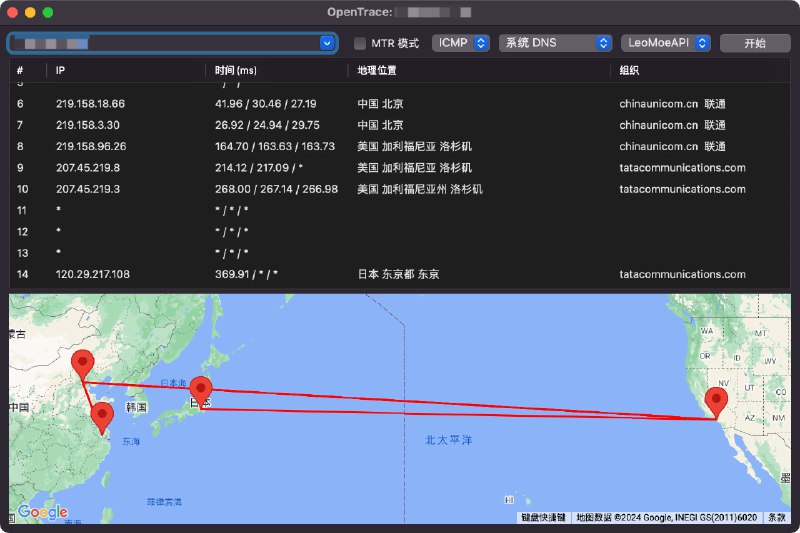
OpenTrace 是 NextTrace 的跨平台 GUI 界面,带来您熟悉但更强大的用户体验。
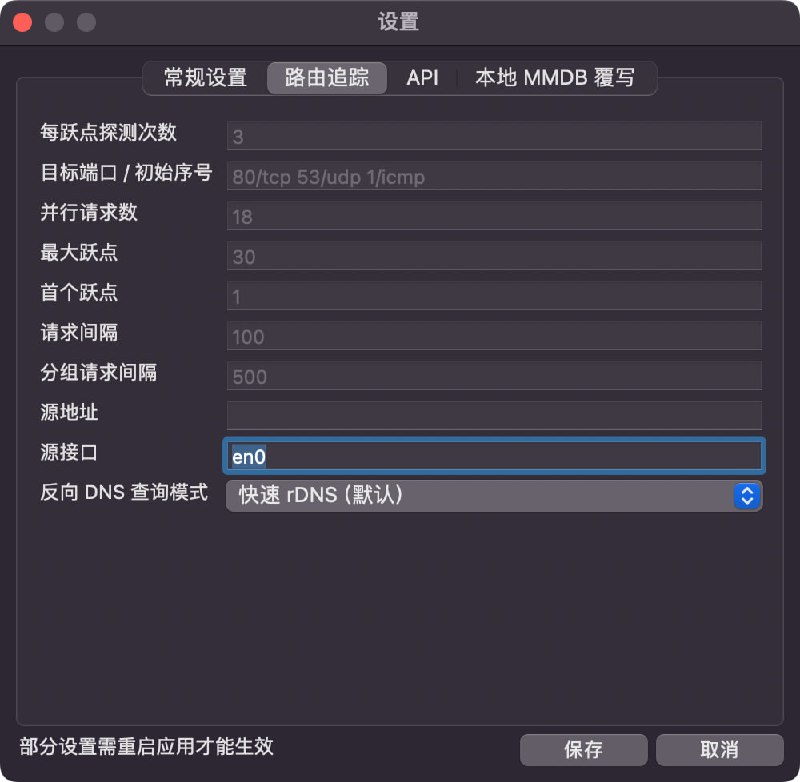
查看仓库 开启 TUN 后, 如图2 设置, 可在不关闭代理 App 的情况下, 正常使用 以太网 或者 WLAN 相关 资源合集导航 欢迎评论 & 转发(请保留来源) 频道 | 群组 机场推荐 大流量电话卡 支付宝红包 可点击查看 恰饭推荐 本频道 99.99% 的内容均为原创 感谢老板们的支持
 #资讯晚知道
 懒癌晚期
懒癌晚期 现在知道也不算晚 的资讯套壳上架•观影神器Docker.com 目前在国内受到 DNS 污染 + SNI 阻断影响无法访问 镜像 public-image-mirror国内外 AI 编程助手收集推荐Cloudflare 免费模型食用指南莱卡发布 iPhone 相机应用 Leica LUX,支持相框图标前端娱乐圈 “当开源项目遇到版本T0的使用者” 的事情原委记录只支持高贵的 M 芯片的 top 工具 资源合集导航 欢迎评论 & 转发(请保留来源)折腾啥 频道 | 群组 机场推荐 大流量电话卡 支付宝红包 可点击查看 恰饭推荐 本频道 99.99% 的内容均为原创 感谢老板们的支持 查看仓库proxies:
- name: "direct"
type: direct
udp: true
ip-version: ipv4-prefer
listeners:
- name: snell-in
type: snell
port: 443
listen: "::"
psk: vgyCqVVztA9fNVYB4ZfW
proxy: direct
version: 4
udp: true
shadow-tls:
enable: true
version: 3
users:
- name: user
password: zdYFc1fSSi6oBZeon84ojA
handshake:
dest: p11.douyinpic.com:4431 [snell][shadow-tls]=snell,xxxx,443,version=4,psk="vgyCqVVztA9fNVYB4ZfW",udp-relay=true,shadow-tls-password="zdYFc1fSSi6oBZeon84ojA",shadow-tls-sni=p11.douyinpic.com,shadow-tls-version=3,reuse=true 服务器合集 合集 群组 恰饭
  联系推广 #Surge #免流 #混淆 #TLS #Snell #ShadowTLS #Shadow-TLS #节点 #服务器
这个项目允许你通过Cloudflare Workers安全地访问GitHub私有仓库中的原始文件,无需直接暴露你的GitHub令牌。
新人Youtuber,需要您的支持,请务必帮我点赞、关注、打开小铃铛,十分感谢!!! (https://youtube.com/@CMLiussss)
 点击查看并支持 CM 佬:
 频道
频道 视频
视频 博客 项目
博客 项目
 功能特性
功能特性 部署alist+下载元数据+部署emby/jellyfin服务全流程自动,无需人工干预
 Docker集成:所有脚本集成到Docker镜像中,避免了系统环境污染。 镜像合并:合并了jellyfin和emby的x86和arm镜像,部署时无需区分镜像名。 自动化脚本:集成云盘清理脚本到alist服务,无需单独部署。 环境配置简化:通过环境变量配置阿里云盘token,无需映射文件。 依赖检查自动化:jellyfin和emby启动时自动进行依赖检查,等待元数据下载完成后自动添加hosts。 设备兼容性:完全兼容所有能运行docker的x86和arm设备。 自动清理与同步:支持自动清理阿里云盘,自动同步小雅元数据。 自动更新地址:自动更新内部的alist,emby,jellyfin访问地址,无需手动配置。 元数据服务更新:通过metadata服务自动更新emby配置和元数据。 一键部署
 部署或更新脚本
脚本支持重复执行
bash -c "$(curl -fsSL https://raw.githubusercontent.com/monlor/docker-xiaoya/main/install.sh)" 卸载脚本bash -c "$(curl -fsSL https://raw.githubusercontent.com/monlor/docker-xiaoya/main/uninstall.sh)" 自定义配置非必需,小白跳过。注意:修改后执行更新脚本会覆盖docker-compose.yml,不会覆盖env文件。
cd 你的安装目录
docker-compose up --remove-orphans -d 发烧友测试版export VERSION=main && bash -c "$(curl -fsSL ${GH_PROXY}https://raw.githubusercontent.com/monlor/docker-xiaoya/${VERSION:-main}/install.sh)" 部署配置推荐 Alist + Emby: 2核 4G内存 140G硬盘 仅部署 Alist: 1核 512M内存 512M硬盘 Alist + Emby + Jellyfin: 2核 4G内存 300G硬盘 Alist + Jellyfin: 2核 4G内存 155G硬盘 服务组件介绍 Alist: 提供资源在线播放,WebDav服务 Metadata: Emby和Jellyfin的元数据管理 Emby: 用家庭影视库的方式,可视化展示Alist中的资源 Jellyfin: Emby的开源版本,功能是一样的 安全建议 开启alist的登陆,alist服务设置FORCE_LOGIN=true,设置webdav的密码WEBDAV_PASSWORD 在emby控制台修改ApiKey,这个key需要配置到metadata和alist服务,变量名:EMBY_APIKEY 欢迎关注我的频道,获取更多信息
Free IP information query APIs / 免费IP信息查询API接口,GET请求,可直接访问,无任何鉴权
 仓库
仓库
wget -O snell.sh --no-check-certificate https://git.io/Snell.sh && chmod +x snell.sh && ./snell.sh127.0.0.1, 假设你监听的端口为 63000, 密码为 oKObPL9BuHcU2c5c 不开 obfs/etc/snell/config.conf[snell-server]
listen = 127.0.0.1:63000
ipv6 = true
psk = oKObPL9BuHcU2c5c
tfo = true
version = 4systemctl restart snell-server
systemctl status snell-servercurl -L https://github.com/ihciah/shadow-tls/releases/download/v0.2.25/shadow-tls-x86_64-unknown-linux-musl -o /usr/local/bin/shadow-tls; chmod a+x /usr/local/bin/shadow-tlscurl -L https://github.com/ihciah/shadow-tls/releases/download/v0.2.25/shadow-tls-arm-unknown-linux-musleabi -o /usr/local/bin/shadow-tls; chmod a+x /usr/local/bin/shadow-tls/etc/systemd/system/shadow-tls.service 抄了下 snell 的服务 微调了下[Unit]
Description=Shadow-TLS Server Service
After=network-online.target
Wants=network-online.target systemd-networkd-wait-online.service
[Service]
LimitNOFILE=32767
Type=simple
User=root
Restart=on-failure
RestartSec=5s
ExecStartPre=/bin/sh -c ulimit -n 51200
ExecStart=shadow-tls --fastopen --v3 --strict server --wildcard-sni=authed --listen [::]:443 --server 127.0.0.1:63000 --tls p11.douyinpic.com:443 --password MVlWnwyr9vEOK8hL
[Install]
WantedBy=multi-user.targetsystemctl daemon-reload
systemctl enable --now shadow-tlssystemctl status shadow-tls
journalctl -f -o cat -n 100 -u shadow-tlsvps [snell][shadow-tls-v3] = snell, 服务器IP , 443, psk=oKObPL9BuHcU2c5c, version=4, reuse=true, tfo=true, shadow-tls-password=MVlWnwyr9vEOK8hL, shadow-tls-version=3, shadow-tls-sni=p11.douyinpic.com--wildcard-sni=authed 所以 可以在客户端改 shadow-tls-sni 不用跟服务端设置的相同p11.douyinpic.com 是混淆, 需要你的套餐支持. 一般需要 443 端口--strict 具体可以看这个文档 免流合集 服务器合集 频道资源合集 恰饭推荐 群组 #Surge #免流 #混淆 #TLS #Snell #ShadowTLS #Shadow-TLS #节点 #服务器

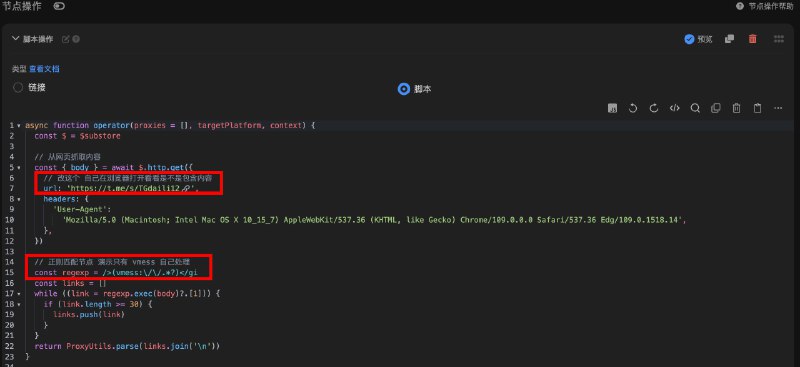 Sub-Store 合集 频道资源合集 恰饭推荐 群组 #Sub-Store #SubStore #脚本 #节点 #订阅 #爬虫 #免费 #白嫖 #频道 #Telegram